Traffic Quality Intelligence for Publishers
Download the latest Invalid Traffic plugin ZIP, upload it to WordPress, activate it, and connect your license from your account. The plugin requires an active license to unlock premium traffic quality features.
Loading latest plugin version...
Download the ZIP, install it in WordPress, activate the plugin, and open the Invalid Traffic dashboard.
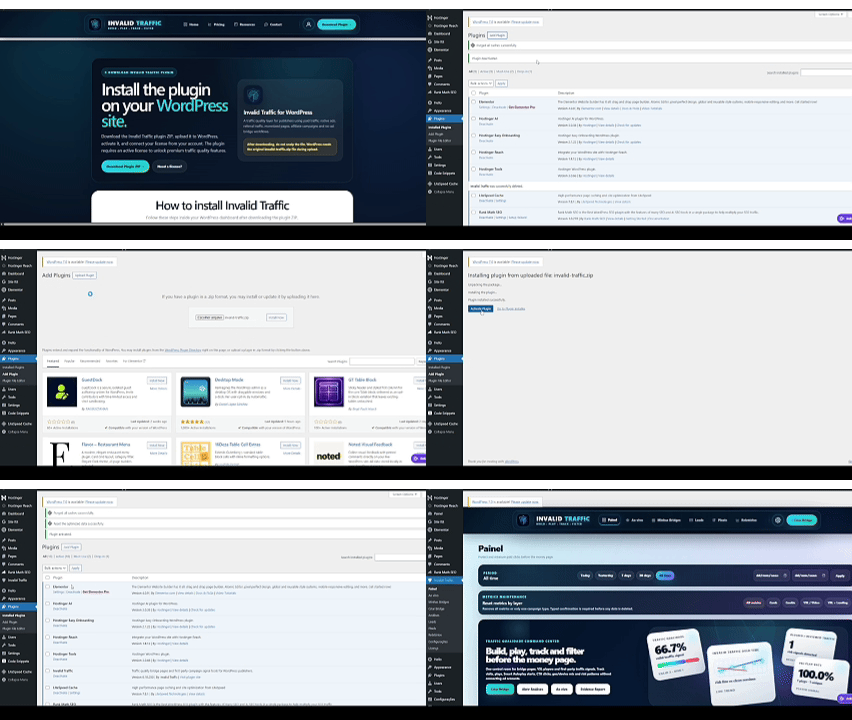
Follow these steps inside your WordPress dashboard after downloading the plugin ZIP.
Click the Download Latest ZIP button above. Your browser will download the newest versioned plugin file, such as invalid-traffic-v0.18.253.zip.
Go to your WordPress admin area. This is usually your domain followed by /wp-admin/.
In the left WordPress menu, click Plugins, then click Add New.
At the top of the page, click Upload Plugin. WordPress will show a file upload field.
Click Choose File and select the versioned invalid-traffic-v0.18.xxx.zip file you downloaded. Do not upload an unzipped folder.
After selecting the ZIP file, click Install Now. WordPress will upload and install the plugin.
When installation finishes, click Activate Plugin. A new Invalid Traffic menu should appear in your WordPress dashboard.
Go to Invalid Traffic → License, paste your license key from your Invalid Traffic account, and click Activate License.
Your license key is available inside your Invalid Traffic account after purchase.
Yes. The plugin can be installed, but premium traffic quality features require an active license. You can choose a license on the Pricing page.
Invalid Traffic is not affiliated with Google, AdSense, Google Ads, Meta, Taboola, Outbrain or any advertising network. The plugin provides monitoring, documentation and traffic quality analysis only. It does not guarantee account recovery, approval, reinstatement, refunds, higher RPM or protection from platform enforcement decisions.